Explore planets, moons and time.
What you are looking at
This is a model of the solar system at the date and time in the top-left corner. It opens over Earth, starting from right now and advancing at 2 hours per second so you can watch the planet turn. Day and night follow the time shown, city lights come on across the night side, and clouds drift over the oceans. Pick another body from the list or its label to switch directly, keeping your relative zoom. On a phone, swipe the planet list near the bottom to see more worlds.
Everything moves the way it really moves. The Moon keeps the same face toward Earth, Jupiter's four large moons race around it in hours and days, and Saturn's rings tilt toward or away from the Sun as the seasons of its 29-year orbit turn. The stars and the band of the Milky Way are in their true places too: 8,920 real stars, every one bright enough to see with the naked eye from a dark site.
For a model you can build, use the scale-model worksheet: choose your available distance or a model Sun or Earth size, then print or download every measurement, including the steps between markers. The planet size chart compares all eight planets on one diameter scale.
How to use the simulator
| To do this | With a mouse or trackpad | On a touch screen | With the keyboard |
|---|---|---|---|
| Look around the selected body | Drag | Drag with one finger | Arrow keys |
| Zoom in and out | Scroll | Pinch | + and − |
| Go to another body | Click it in the list or its label | Tap it | Tab to it, then Enter |
| Pause or play | The amber button | The amber button | Space |
| Speed time up or slow it down | − and + beside it | − and + | , and . |
| Run time backward | The double arrow | The double arrow | — |
| Hide or show the controls | — | — | H |
The details panel shows the selected body's size, year and live distances. On a phone, tap Details to open it. Choose a moon to visit it, or open More facts for mass, gravity, day length, axial tilt and temperature. Bodies other than Earth also show their distance and light-travel time from Earth.
Choose Whole system to see all the planetary orbits, Inner planets for Mercury through Mars, or Planet view for a close-up. Selecting a body while viewing the whole system updates its facts without moving the camera. Reset view restores the framing for the current view.
Tap the speed to choose a rate directly. Share copies the current moment, camera, selected body, speed and display settings. Pause first if you want someone to open a still view. The camera buttons zoom in, zoom out and enter Focus mode. More has planet comparisons, picture download and fullscreen controls. Choose High graphics detail there for sharper edges and the most detailed Earth and Moon maps; Auto adapts to your device. Saved pictures are drawn at the highest resolution in either mode.
Try a day on Earth
Open the day-and-night experiment. Pick a coastline, then watch the clock and the boundary between daylight and darkness. How much simulated time passes before that coastline faces the Sun again?
Pause and drag toward the night side to see the city lights. Use More → Compare planets to compare Earth's diameter with Jupiter's. The circles share one size scale; the distance and light-travel readings follow the date in the simulator.
For a different question, change a planet's launch speed in the gravity sandbox or compare bent and straight light paths around a black hole. For a game, take on the six gravity challenges, from a first orbit to a Jupiter slingshot.
Travel through time from 1800 to 2100
Time runs at speeds from real time to a year per second, forward or backward. New visits start at 2 hours per second; shared links keep their chosen speed. At one day per second you can watch the inner planets lap the outer ones. At a month per second Mars traces its looping path relative to Earth; see the dates of each Mars retrograde loop. Choose a date in the date box to jump straight to it, or press Now to come back to the present at real time.
The date range is deliberate. We compared the computed positions with NASA JPL's Horizons system across 1800 to 2100 and the simulator stays inside that tested span.
Eclipses and other sky events
The Events button lists what is coming up from the date on screen: solar and lunar eclipses, oppositions of the outer planets (when they are brightest and up all night), the greatest elongations of Mercury and Venus, and the equinoxes and solstices. Choose one and the simulator jumps to that moment and frames the scene. Under Try this, the seasons activity steps through the next equinoxes and solstices with Earth seen side-on, so you can watch which hemisphere leans toward the Sun, and a second one opens the total solar eclipse of 2 August 2027 with the Moon's shadow on Earth. To step through every solar and lunar eclipse from 1800 to 2100, one after another, open the eclipse simulator. For where that shadow touches the ground, see the 2027 eclipse path map; for local times and coverage of every eclipse in 2026 and 2027, see eclipse dates and visibility by town.
Shadows are calculated for every point on each body from the size and position of the Sun and of nearby worlds. That is how the dark spot of the Moon's shadow crosses Earth during a solar eclipse, how Earth's shadow turns the Moon a coppery red in a total lunar eclipse (sunlight bent through our atmosphere still reaches it), and how the small black shadows of Io, Europa, Ganymede and Callisto slide across Jupiter's clouds.
The sky from your location
Choose Sky to see the Sun, Moon and planets above the horizon at a chosen moment. Pick a location or open Coordinates to enter latitude and longitude, set the UTC date and time, then choose Update sky. North is at the top of the diagram; east is on the left because you are looking up. The centre is directly overhead.
The table gives each body's ecliptic longitude, direct or retrograde motion, altitude and azimuth. The Moon's phase and illuminated fraction appear beside the diagram. To check which planets are retrograde on any date, use the retrograde calendar. A body above the horizon can still be hidden by daylight or weather; these coordinates do not include atmospheric refraction.
Show this moment in 3D returns to the solar system at that exact time, paused. Export positions saves the coordinates and their assumptions as a local JSON file. Your entered location stays on your device. See how the sky coordinates are checked.
True scale, and why space looks empty
Sizes and distances are true unless you turn on Enlarge. The distances are hard to imagine: light from the Sun takes about 8 minutes 20 seconds to reach Earth and over 4 hours to reach Neptune. Zoom out to see the whole system and the planets shrink to points, so each is marked with a small ring and its name. Enlarge draws the planets, and the orbits of their moons, 20 times larger so you can see them as discs from farther away; it is labelled because it is not to scale.
How accurate is it?
For a fixed reference beside the simulation, use the eight-planet size comparison and fact table. Download the diagram for a lesson or the CSV for a spreadsheet. Its diameters share one scale; its mean orbital distances are reference values rather than positions at the selected date.
Positions come from established orbital theories rather than from a fixed animation. We test them against NASA JPL's Horizons system, the reference ephemeris used for spacecraft navigation:
- Planets and Pluto: within 30 arcseconds of Horizons at every sample from 1800 to 2100, about the width of Jupiter's disc as seen from Earth.
- The Moon: within 5 arcseconds and 25 km (2020 to 2030).
- Jupiter's four large moons: within 700 km.
- The other moons: from JPL's published mean orbits, adjusted to match Horizons; most stay within about 2 degrees of their true place around their planet.
The 3D positions are geometric. The Sky inspector separately computes Earth-observed coordinates, including light-travel and aberration corrections for the planets. Accuracy and sources explains the methods, time conventions and tests in full.
Choose the model for your question
Use this view to explore the solar system at a chosen date. To add a body and see how the orbits change, open the gravity sandbox; it evolves its own Newtonian system from the starting conditions. For light bending around a non-rotating black hole, use the black hole simulator. These models answer different questions and have separate accuracy limits.
Compare the eight planets
The inner planets are small beside the gas and ice giants. These circles use one diameter scale, so Earth is about one-eleventh the diameter of Jupiter. Distances between circles are for layout only.
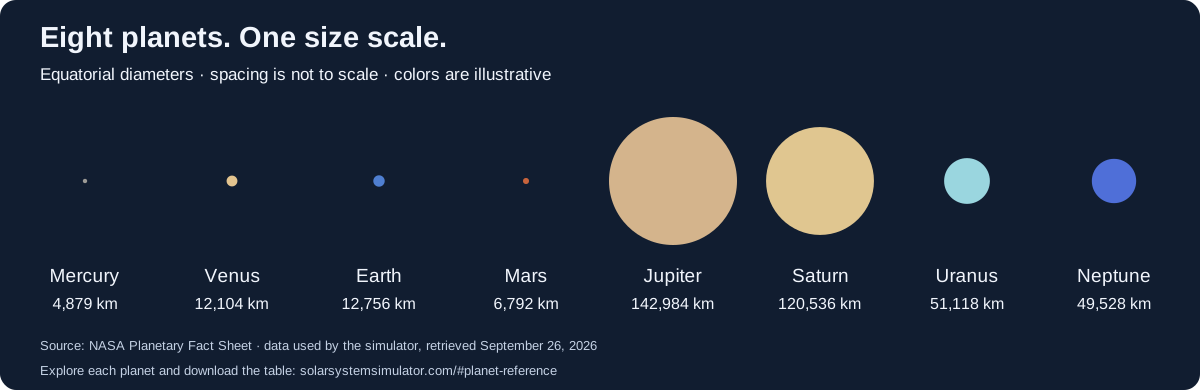
| Planet | Diameter (km) | Mean Sun distance (million km) | Year (Earth days) |
|---|---|---|---|
| Mercury | 4,879 | 57.9 | 88 |
| Venus | 12,104 | 108.2 | 224.7 |
| Earth | 12,756 | 149.6 | 365.2 |
| Mars | 6,792 | 228 | 687 |
| Jupiter | 142,984 | 778.5 | 4,331 |
| Saturn | 120,536 | 1,432 | 10,747 |
| Uranus | 51,118 | 2,867 | 30,589 |
| Neptune | 49,528 | 4,515 | 59,800 |
Mean distances are reference values, not today's separation from the Sun or Earth. Select a planet above to see the live distances for the displayed date. The gravity sandbox lets you experiment with a separate model of orbital motion.
Download size chart (SVG) · Download planet table (CSV)
Source: NASA's Planetary Fact Sheet, using the simulator's September 26, 2026 snapshot. Read accuracy and sources for the model's separate position checks.
Build a solar system to scale
Set the space you have, or the size of your model Sun or Earth. The worksheet uses the same scale for every diameter and distance.
Distances use the planets’ mean distance from the Sun, not their positions today. Planet diameters are equatorial; Saturn’s rings are excluded.
Sun to Neptune distance: 30 m. One scale for both sizes and distances: about 1:150,500,000,000.
| Body | Diameter (mm) | From Sun (m) | Step from previous (m) |
|---|---|---|---|
| Sun | 9.245 | 0 | — |
| Mercury | 0.03242 | 0.3847 | 0.3847 |
| Venus | 0.08043 | 0.7189 | 0.3342 |
| Earth | 0.08476 | 0.994 | 0.2751 |
| Mars | 0.04513 | 1.515 | 0.5209 |
| Jupiter | 0.9501 | 5.173 | 3.658 |
| Saturn | 0.8009 | 9.515 | 4.342 |
| Uranus | 0.3397 | 19.05 | 9.535 |
| Neptune | 0.3291 | 30 | 10.95 |
For a straight-line model, start at the Sun and measure each step from the previous marker. These are model spacings, not current separations between planets. Values are rounded; use the distance from the Sun to check your placement.
Allow 30 m from the Sun to Neptune along a straight path, or about 60 m across for a model surrounding the Sun. Tiny planets may need labels to stay visible; making their markers larger changes the size scale.
The method follows NASA JPL’s scale-model activity. Data: NASA Planetary Fact Sheet and IAU 2015 nominal solar radius; simulator snapshot September 26, 2026.
solarsystemsimulator.com/#scale-model
Questions
Are the planet positions in this solar system simulator real?
Yes. Every position is computed for the moment shown from published orbital theories, the same kind of mathematics observatories use. The planets and Pluto agree with NASA JPL's Horizons system to within 30 arcseconds at every date we tested between 1800 and 2100, and the Moon to within 5 arcseconds and 25 km.
Why do the planets look like dots when I zoom out?
Because the solar system is mostly empty space. At true scale Earth is about 12,700 km across but 150 million km from the Sun, so from far away it is far smaller than a pixel. The simulator keeps every body at its true size and marks small ones with a labelled dot. Turn on Enlarge to draw planets and the orbits of their moons 20 times larger.
Can I see a solar or lunar eclipse?
Yes. Open Events and choose an eclipse: time jumps to the moment of greatest eclipse and the camera moves into position. The shadows are computed, not painted on, so you see the Moon's shadow on Earth during a solar eclipse and the copper-red Moon inside Earth's shadow during a total lunar eclipse.
Does it work on a phone or a school Chromebook?
It runs in any current browser with WebGL 2, including Chrome on Chromebooks, Safari on iPhone and iPad, and Chrome on Android. It lowers its resolution automatically on slower devices to keep the motion smooth. Nothing is installed and no account is needed.
How far forward and backward can I go?
From January 2, 1800 to December 30, 2099. That is the span over which the positions were checked against JPL Horizons; outside it the simulator stops rather than show positions we have not tested.